Magic DVD Copier is a very easy and powerful DVD copy software, which
can copy any DVD movie to blank DVD without any loss of quality, or
compress a DVD9 movie to fit on a 4.7 GB DVD. You need only insert your
DVD movie and a blank DVD then press Go, everything will happen
automatically and complete within 20-60 minutes. You can then enjoy the
new DVD on any PC or Home DVD Player. Magic DVD Copier can also copy DVD
movies to hard drive without any loss of quality. You can then enjoy
them anytime without DVD discs.
Key Features:
- Copy DVD movie to blank DVD in 1:1 mode
- Compress a DVD9 movie to a 4.7 GB blank DVD
- Split a DVD9 movie to two 4.7 GB blank DVDs without any loss of quality
- Copy main movie or specified titles only
- Copy DVD movie to hard drive and burn DVD movie from hard drive
- Remove all the restrictions of DVD (CSS, Region, RCE, Sony ARccOS, PuppetLock)
- High speed, copy a full DVD disc in 1:1 mode within 20-40 minutes
- Very easy to use, just by one click
- Support almost all DVD Writers and blank DVDs (DVD-R,DVD-RW,DVD+R,DVD+RW,DVD+R DL,DVD-R DL)
Whats New :
Add all the current decryption files into the setup file, including the
popular newly-protected DVDs, such as INSANITY MAX:30 Workout, The
Expendables 3, Tyler Perry's a Madea Christmas etc.
• Text with your friends
• Make free phone and video calls with HD sound quality
• Share photos,video messages, voice messages, locations, stickers and emoticons
• Create group messages with up to 100 participants
• Follow Public Chats– get on the inside with your favorite celebs, brands and personalities; watch their conversations unfold in real-time, ‘like’ comments and share multi-media content
• Download stickers from the Sticker Market, to make messaging fun!
• Ability to sort and reorder stickers
• Push notifications guarantee that you never miss a message or call, even when Viber is off
• Integration with native contact list for calls and messages
• Support for the Viber Desktop application on Windows and Mac
Size : 34.1MB
Version : 5.2.1.36
Requires: Android 2.3 and up
Download လုပ္နည္းမသိလွ်င္ေအာက္မွာဖတ္ပါ၊၊
ေအာက္ကေဒါင္းေလာ့ေဘာတြန္ကိုႏုိပ့္ပါ၊၊
၅ စကၠန္႔ေလာက္ေစာင့္ပါ ၿပီးလွ်င္ညာဘက္ေဒါင့္မွာ အဝါေရာင္ေလးနဲ SKIP AD ဆိုတာကိုႏုိပ့္ပါ၊၊
Wondershare Video Converter Ultimate 8.0.4.0 Multilingual | 43.4 Mb
Wondershare Video Converter Ultimate is an all-in-one DVD Converter
Software. You can convert DVD to video and convert video between popular
video formats and burn video to DVD.
Key Features
- All-in-One DVD Video Converter
- Universal DVD and Video Converter
- Convert DRM protected files to common media files
- Total playback freedom on almost all video/audio portable devices
- Amazing Video to DVD Converter
- Professional video download and transfer
- Download videos from online video sharing websites
- Transfer media files bwteen PC and portable devices
- Amazing video/DVD editor
- Crop, adjust video effect, and add watermark/subtitle with two real-time preview windows
- Clip video file/DVD chapter
- Merge multiple files
- Customize DVD menu
- Capture picture
- Customizable output profile for your every need
- Flexible output video/audio settings
- Apply more than one profile to one file
- Easy operation and free technical support
- Easy-to-use
What's New in Version 8.0
1. Optimize wireless transfer
2. Support to abstract cover information for video file with Media Server
3. Wondershare Player app in mobile device can open Media Server directly
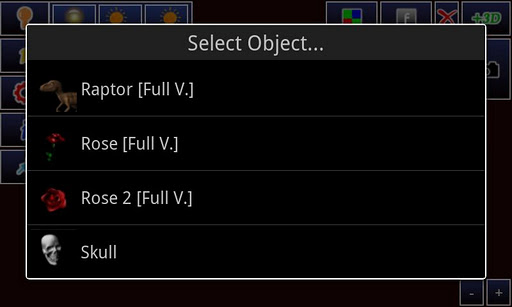
AR Camera 3D uses augmented reality (AR) to add and move small 3D objects in a real live environment You can take photos with virtual elements such as: cars, airplanes, droids, image, etc.. It supports light direction, zoom, rotation. Warning! try several times to run the program if the control fails to be licensed! !!! Sony Ericsson not compatible, try it at your own risk Important: The drivers
of the camera and the 3D engine developed by the manufacturers have
bugs. These bugs create malfunctions or complex mechanisms. Help me to
work around. This software is still in development so please write me an email if you have a bug report or constructive comments Tested devices: Samsung Galaxy S2 Samsung Galaxy S Samsung Galaxy Gio HTC Desire HTC Desire Z Feature: - Integrated gallery - Object Zoom - Object rotation - Several Objects - Light direction - Take photos (files are saved in sdcard/images) with integrated Camera NB. Test your compatibility with the lite version! ************************************** - No Banner - No Link in output image - more than 25 Objects 3D ************************************** Quick Guide: ----- * Start AR Camera 3D * Select the 3D object by clicking the "open" button * Change Light position with Light Menu * Rotate and Move using finger gestures * Take your photo
Tapatalk
makes navigating and discovering online discussion forums on your
mobile device easier than ever! This new full-featured edition of
Tapatalk includes full HD phone and tablet display support and unlimited watermarked photo sharing.
Stay
connected to your favorite forums on-the-go with this award-winning
mobile app. Tapatalk offers you access to over 50,000 internet
communities in a streamlined mobile interface. Fast and accessible
features make reading, posting, sharing pictures, and staying current
with private messages, a snap! Tapatalk aggregates content from a
massive network of communities that cover a wide variety of interests,
from automotive enthusiasts to parenting, gardening to hiking - You will
find a forum that matches your interests full of fellow enthusiasts
that share your passions.
What's New 1. Fixed subforum menu display issue. Subforum menu now loads more quickly. 2. Fixed "subscribed topics" view. Now this view loads your favorite topics and threads. 3. Added "mark as read" feature as with earlier versions. 4. Added unread status feature for subforums as with earlier versions. 5. Smart loading of last view: app remembers which tab you last used, and reopens it on your next login. 6. Various other fixes to improve stability.
WinLock is a comprehensive security solution for personal or publicly
accessible computers. It is a program that ensures that only authorized
people can access sensitive information on your computer. With WinLock
you can control how long others can use your computer. It runs from the
system tray and requires a password to gain access to the available
settings. It loads automatically with Windows and allows you to add an
optional startup message, provide audio notification, and set the time
limit. Once that limit is reached, Windows is summarily shut down. You
can toggle the timer on and off from the tray. When enabled, there is no
way around it without the proper password. Parental control system lets
you activate filters that allow access to websites that are useful for
learning and reference only. That's why responsible parents install
WinLock on every computer that their children use. Window blocking
blocks virtually any application or any part of it: window, popup
message, dialog box. WinLock also lets you to disable Windows hot keys
(such as Alt-Ctrl-Del, Alt-Tab, Ctrl-Esc, etc.), lock Windows desktop,
hide the Start button and Switch bar, lock files and folders, filter
Internet content, apply lockdown security for public-access computers
(companies, schools, hotels, public agencies).
Use WinLock Remote Administrator to control, configure, and monitor each
remote WinLock client. This network security solution helps quickly
configure remote WinLock clients via Internet, lock remote workstations,
capture client's screenshots, apply security profiles, and send pop-up
messages through of easy-to-use interface.
System restrictions - disable command prompt, desktop, control panel, safe mode, and more...
Time-limited access - control how long your children can use the computer.
Restrict Start Menu - hide the selective Start menu items, block context menus.
Control Internet access - allow access only to the trusted sites only, and block all others.
Software filter - block access to the downloaders, games, messaging clients, or CD burners.
Kiosk mode - lockdown security for ATMs, terminals and public-access computers (companies, schools, hotels, etc).
Installation blocker - prevent users from installing the software.
Hide drives - hide your system and network drives in Windows Explorer.
Window blocking - block virtually any application or any part of it: window, popup message, dialog box.
Logging - monitor changes to the system and writes these changes to the log file.
One-button protection - click one button to lock workstations the way you want.
No subscription - you will get a lifetime license to the current version and free software upgrades for one year!
Key features:
System restrictions - disable command prompt, desktop, control panel, safe mode, and more...
Time-limited access - control how long your children can use the computer.
Restrict Start Menu - hide the selective Start menu items, block context menus.
Control Internet access - allow access only to the trusted sites only, and block all others.
Software filter - block access to the downloaders, games, or messaging clients.
Kiosk mode - lockdown security for ATMs and terminals.
Installation blocker - prevent users from installing the software.
Logging - monitor changes to the system.
What's new in this version:
Improved support for touch-screen devices.
Improved support for Internet Explorer 11.
Opera 24 compatibility.
WiFi Mouse Pro v1.6.5 + Mouse server | 4.8 MB
Transform your phone into a wireless mouse, keyboard and trackpad using
WiFi Mouse. WiFi Mouse supports speech-to-text as well as multi-finger
trackpad gestures. It also support media controller, explorer controller
and ppt presentation controller features. WiFi Mouse enables you to
control your PC, MAC or HTPC effortlessly through a local network
connection.
Features:
* Mouse cursor movement:
Slide on phone's screen to make the PC/Mac mouse cursor make movement.
* left and right click support
Tap the phone's screen to make PC/Mac mouse left button click.
Double fingers tap the phone's screen to make PC/Mac mouse right button click.
* Middle mouse button scroll
Up/down slide the phone's middle button picture to make PC/Mac middle mouse button scroll.
Two fingers slide up/down to make PC/Mac middle mouse button scroll.
* Remote keyboard input:
Press any mobile phone's key picture, PC/Mac will do the same thing.
* PC/Mac hot keys and combination key:
You can press two keys at the same time, such as ALT+F4,Ctrl+C,Ctrl+P and so on.
* Speech-to-text input for all languages:
If you input method support voice input, PC/Mac will show the same text as the phone get.
* Close to proximity sensor to show desktop:
When your hands close to the phone's proximity sensor to make PC/Mac show desktop.
* Mouse & keyboard full screen:
Very big Mouse buttons and key button.
* Remote media player controller:
You can play/pause/next/previous media players, such as Windows media players, VLC,
Winamp and so on.
* Remote explorer controller:
Unified remote control IE/Chrome and other internet explorer, you can close the tab,
go to home page,create new tab, go to favorite list, refresh the current page and so on.
* PPT Presentation controller:
You can start/stop Power Point /Keynote, and turn the next/previous page for presentation.
* Auto-connect on application startup
* PC/Mac window controller:
Maximize/Minimize/close the current window.
* Compatible with XP/Windows Vista/Windows 7/Windows 8/Mac OSX/Linux (Ubuntu).
Gestures:
* Tap-to-click
* Tap and move for drag
* Two finger tap for right click
* Two finger scroll
* Pinch to zoom
* Three finger drag or highlight
* Four finger swipe down to show desktop
* Four finger swipe up to maximise current window
* Four finger swipe sideways to change current window focus
* Left handed mouse support (swap left and right mouse click)
* Show desktop when hands over proximity sensor
Note: WiFi Mouse only support Wi-Fi connection(wireless mouse), Bluetooth is not support.
What's New
1, Add French,Germany,Russian,Dutch,Italian,Japanese,Korean,Chinese.
2, Improve user interface.
Is your computer safe? New security vulnerabilities are found every day
by which many malicious programs or people attack the Windows operating
system. Your computer may HAVE been attacked. Please protect your system
with Shadow Defender ASAP!
Shadow Defender is the best easy-to-use PC/laptop security and privacy
protection tool for Windows operating systems. It provides an excellent
way to prevent unwanted or malicious changes from being made to your
PC/laptop. With Shadow Defender you can run system in a virtual
environment, called Shadow Mode. And all the attacks will happen in the
virtual environment, not in the real environment. If attacks happened,
all you need to do is to reboot your system. After reboot, your system
will be restored to the original state, as if nothing happened. And
meanwhile you can save any selected files and folders to the real
environment. Features: 1. Prevent any unknown and future virus. 2.
Protect your privacy effectly. 3. Eliminate the system downtime and
PC/laptop maintenance cost. 4. Surf the internet safely.
A powerful tool to protect your computer
Easy, powerful and effective. Shadow Defender is the easiest-to-use
solution to protect your PC/laptop from unwanted changes.the best
PC/laptop Security and Privacy Protection tool.
What is Shadow Defender ?
Shadow Defender is an easy-to-use security solution (for Windows
operating systems) that protects your PC/laptop real environment against
malicious activities and unwanted changes.
Shadow Defender can run your system in a virtual environment called
'Shadow Mode'. 'Shadow Mode' redirects each system change to a virtual
environment with no change to your real environment. If you experience
malicious activities and/or unwanted changes, perform a reboot to
restore your system back to its original state, as if nothing happened.
With Shadow Defender, you have the flexibility to specify which files
and folders are permanently saved to the real environment. This ensures
important files and folders are kept after a reboot.
If you want to make a maintenance-free computer, Shadow Defender will be your best choice.
Shadow Defender Features
1. Prevent all viruses and malwares.
2. Surf the internet safely and eliminate unwanted traces.
3. Protect your privacy.
4. Eliminate system downtime and maintenance costs.
5. Reboot to restore your system back to its original state.
Shadow Defender Users
1. Maintain a system free from malicious activities and unwanted changes.
2. Test software and game installations in a safe environment.
3. Protect against unwanted changes by shared users (suitable for workplaces and educational institutions).
1.Install
2.Run keygen or use a given serial to register
3.Block with firewall
4.Done.
Freemake Video Converter is a tool that can
convert videos from different sources, photos, and music to AVI, MP4,
WMV, MKV, FLV, SWF, MPEG, 3GP, DVD, Blu-ray, MP3, YouTube, Apple, Sony,
& Android devices.
It also allows to download online videos from YouTube, Facebook, or
Vimeo and 50 more websites by a quick copypaste of video URL into the
program. Due to the advanced preset editor, you can customize conversion
parameters and create your own presets.
Rip DVD, burn Blu-ray/DVD video discs. Convert any video with embedded
subtitles or add external SRT/ASS/SSA subtitles to a video. Convert
videos to devices: iPod, iPhone, iPad, Sony PSP, PS2, PS3, BlackBerry,
Xbox, Apple TV, Android mobile devices, smartphones.
Turn photos & MP3 to slideshows. Edit videos (cut, join, rotate,
limit output file size, adjust to aspect ratio). Upload videos, photos,
MP3 to YouTube directly without visiting the website. Freemake Video
Converter supports CUDA And DXVA technologies and thus provides the
fastest video conversion due to graphics card!
Features:
200+ Input Formats:
Input any video files: AVI, MP4, MKV, WMV, MPG, 3GP, 3G2, SWF, FLV, TOD,
AVCHD, MOV, DV, RM, QT, TS, MTS, etc. Import music (MP3, AAC, WMA,
WAV), and photos (JPG, BMP, PNG,GIF) to turn them into video free and
easily! All supported formats
Output to AVI, MP4, MKV, FLV, 3GP, MP3, HTML5:
Convert video free to the most popular video formats. Rip DVD movie
(unprotected) to AVI, WMV, MP4, MPEG, MKV, FLV, SWF, 3GP. Convert video
to Flash and embed it directly to your web page. Create HTML5 video
(Ogg, WebM, H.264) for modern web browsers.
Convert Free to iPod, iPhone, iPad, PSP, Android:
Optimize videos for Apple, Sony, and Android devices. Convert videos
free to iPod Classic, iPod Touch, iPod Nano, iPod 5G, iPhone, iPad, Sony
PSP, PS2, PS3, BlackBerry, Samsung, Nokia, Xbox, Apple TV, Android
mobile devices, smartphones, etc.
Fastest Video Converter with CUDA and DXVA:
Freemake is the only free video converter that features integrated both
CUDA and DXVA technologies for the fastest ever video conversion and
less CPU usage. The software automatically detects the optimal
conversion parameters and switches on/off CUDA and DXVA for better
conversion results.
Burn Blu-ray Video:
Convert your movies to video Blu-ray format and burn high-quality BDs
for free. Create Blu-ray discs out of any input content: video, audio,
photos, URLs. Burn multiple Blu-ray copies and save the resulted Blu-ray
video to HDD as an ISO image or Blu-ray folder.
Burn DVD – up to 40 hours:
Unlike other software, our free video converter doesn’t have a
two-hour limit and can burn DVD video up to 20h to a Standard DVD or 40h
to DVD-DL. With our free video converter, you can make multiple DVD
copies and save the output DVD video to your PC as an ISO image or DVD
folder.
Video Converter with Subtitles Support:
Convert DVD, MKV, MOV with embedded subtitles to any video format or
device for free. Add SSA/SRT/ASS external subtitles to any video with
our free video converter.
Advanced Preset Editor:
Take total control of the output result by customizing conversion
parameters. Create your own presets by establishing video and audio
codecs, frame size, etc. Choose an icon, and save you custom preset for
further usage with our free video converter.
Upload Photos and MP3 to YouTube:
Upload videos, photo slideshows, MP3 to YouTube with our free video
converter. Upload AVI, WMV, MP4, 3GP, JPG, BMP, GIF, MP3 to YouTube. The
program will cut videos (if required) into 15-minute parts and insert
them into one YouTube playlist.
Make Slideshows and Visualizations:
Turn photos and MP3 into slideshows with background music for free. Edit
your slideshow: add, delete, and shuffle photos, enable panorama
effect. Create music visualizations and upload photos to YouTube for
free!
Cut, Join, Rotate, Limit size, Adjust to aspect ratio:
Cut video parts from your file. Flip or rotate video. Join several
videos into one file, add transitions between parts. Fit the output file
size to any limit (e.g. 700 Mb, 1.4 Gb, 4.7 Gb). Adjust output video to
the established aspect ratio: add black bars, stretch, zoom,
auto-adjust.
Gold Pack:
Gold Pack - Gold Pack is a set of premium features for Freemake Video
Converter. Enhance your DVD burning and video editing experience! Make
your video converter even more powerful.
+Black Bars Removal +Exclusive DVD Menus +Any DVD Background +Automatic Backup
Subtitles Pack:
Subtitles Pack - Subtitles Pack is a set of advanced features for
Freemake Video Converter to work with video subtitles. Edit subtitles
for your movie easily. Watch movies with subtitles with pleasure!
+Edit subtitles size +Change subtitles font
+Watch movies with subtitles in any language +Enjoy movies with
subtitles on any device
TeraCopy is a small software application whose purpose is to help you
copy and move files from one location to another using fast and
intuitive actions.
The tool lets you generate a pending queue with multiple file operations
which can be run simultaneously and skip corrupt files without any
popup messages or interruptions.
· Copy/move to your favorite folders.
· Save reports as HTML and CSV files.
· Select files with the same extension/folder.
· Remove the selected files from the copy queue.
Tweaks during installation
During the installation process you may opt for installing the program on your computer or running its portable version.
If you opt for the portable mode, it is important to mention that the
utility doesn’t leave any traces in the Windows registry. You may copy
it on any USB flash drive or other devices and take it with you
whenever you need to copy and move files on the breeze.
Additionally, you are allowed to create a desktop icon and make file associations for the MD5 and SFV file formats.
Minimal interface
The primary panel is very small, embeds only a few features that you can
play with and remains on top of other windows by default. With just one
click on the “More” button, you can make the tool reveal an extra set
of options designed for helping you view details about each item, such
as source file, size, status, source and target CRC.
Copying and moving features
Multiple files and directories can be added to main window using the
drag-and-drop support. What’s more, you can select the target location
and move or copy the current items.
If files are already included in the saving folder, you can make the
application ask for confirmation, overwrite all files or only the older
ones, or skip or rename all the items. Plus, you are allowed to pause
the current process and limit the filename lengths to 255 characters.
Deletion, comparison and post-task actions
What’s more, you can delete files from the disk or send them to the
Recycle Bin, compare files in the source location with the ones in the
output by checking out their CRC values, as well as perform several
actions at the end of a task, such as shut down the computer, eject
drive, run test or exit TeraCopy.
Configuration settings
TeraCopy comes packed with several parameters designed to help you
confirm “drag-and-drop” actions, use the utility as your default copy
handler, integrate the tool into the Total Commander and Directory Opus
file managers, play sound notifications, use system write cache, as well
as alter the colors used for the progress bar.
An overall efficient tool
All in all, TeraCopy offers an intuitive approach and several basic features for facilitating the copying or moving process.
What's New in version 3.0 Alfa December 30th, 2014
*Faster copy.
*Create MD5 checksum filelist on request.
*Single tabbed interface for multiple file transfer operations.
*Copy files using elevated Windows Service and Volume Shadow Copy.
*Unlimited number of files, the internal file list stored on disk instead of memory.
1.Install
2.Run and use given license to activate
3.Done.